Fabric API
Download Fabric API to load all Minecraft Java mods on your PC for free. Get the core library that powers tools that let you play with many Minecraft mods at once.
What is Fabric API?
Fabric API, commonly known as the Fabric API mod, is a free and open-source toolchain library that helps developers make modifications in Minecraft Java. Fabric API stands for Fabric Application Programming Interface, a program that is easy to use and simple, adding new modifications, features, and capabilities to the Vanilla game.
Fabric API actually offers a set of APIs, which are made for Vanilla functionality, allowing simple to advanced development.
To use a Fabric mod, you need to install the Fabric Loader, a tool that actually runs Fabric API for full functionality.
So, if you are unable to download Fabric API or don’t know how the loader works, let’s understand the steps to download and install Fabric API.
How to Download and Install Fabric API
To install Fabric API, you need to download and install the Fabric Loader first. This is the same loader that most mods use to make modifications to their specific programs and applications. Fabric Loader is a flexible, platform-independent Minecraft mod loader that is modular and lightweight. It provides essentials for mod loading and rudimentary modding. Here is the step-by-step guide.
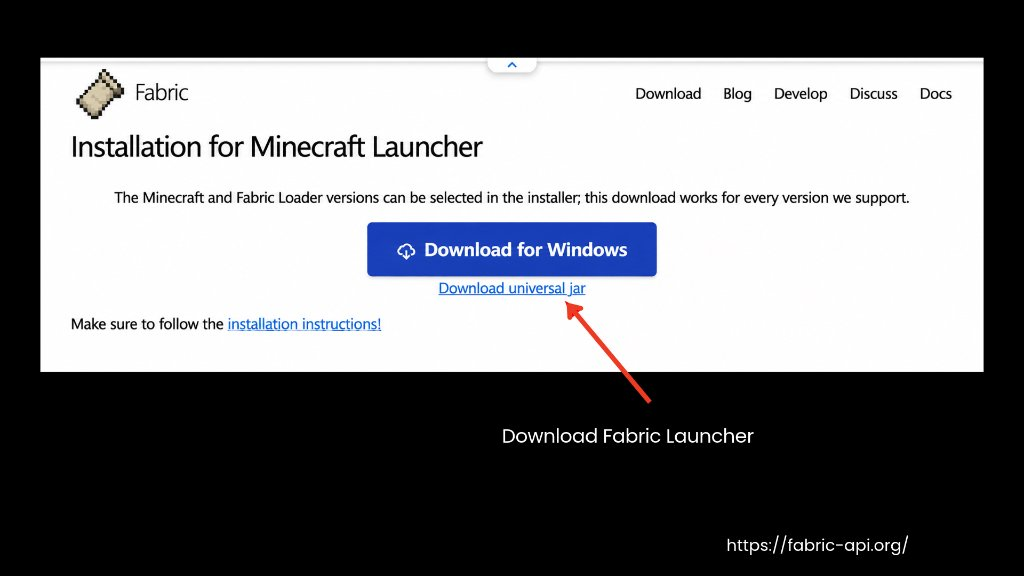
Download Fabric Launcher:
- Go to our website and download the Fabric Loader by clicking on Download Universal JAR.
- You can download it from the official Fabric Loader website as well.
 Click to Zoom
- You need to choose your preferred version, such as the installer for the vanilla launcher or dedicated servers.
Set Up Fabric Loader and Fabric API on Your Desktop:
Once downloaded, you can open the game and try to run it. This helps you verify the installation and create the mod folder. If you are unable to open the loader, you may be missing the Java installer. Follow these instructions.
- Drag the Fabric installer setup from your downloads folder to the desktop.
- Now, download Fabric API. Open the old versions page and choose the one that matches your Minecraft version.
- Make sure to choose a version that is compatible with your Minecraft version and works with Fabric.
- Once the download is complete, drag the setup file to your desktop, just as you did with the Fabric Loader.
- Once everything is ready, install the Java x64 installer on your system to ensure Minecraft and Fabric API run properly.
- In case you are unable to download Java, install Jarfix, an executable program that repairs all your .jar files on your system and helps you run Minecraft Java Edition.
- Once the Jarfix.exe download is complete, go to your desktop and right-click the Fabric Launcher.
Open Fabric Launcher:
Once you are all set with downloading the Fabric Launcher, Fabric Mod/API, Java, or Jarfix.exe, close everything and head to your desktop.
-
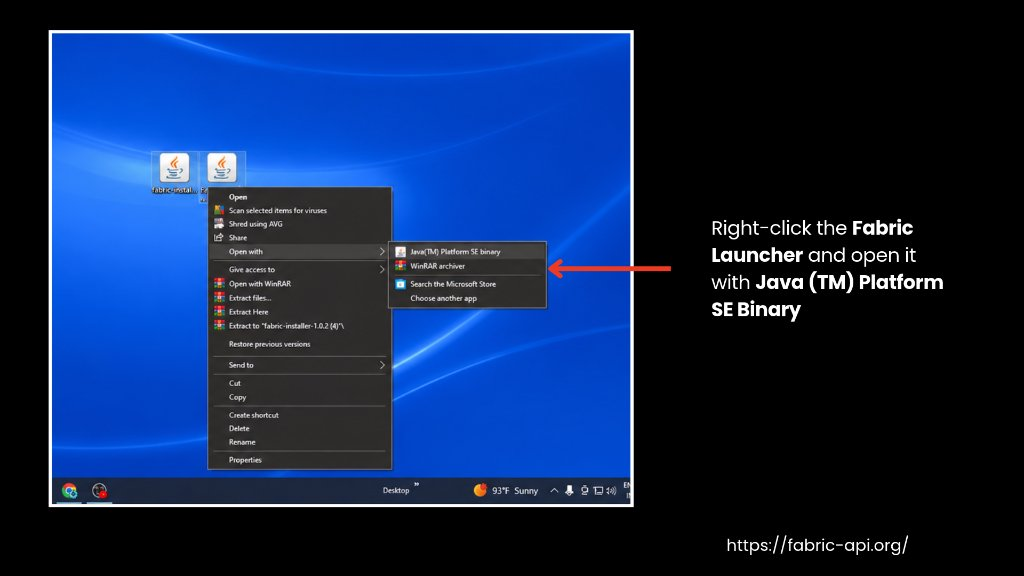
Right-click the Fabric Launcher and open it with Java (TM) Platform SE Binary.
 Click to Zoom
- If you have not installed Java or Jarfix on your system, you won’t see this option.
-
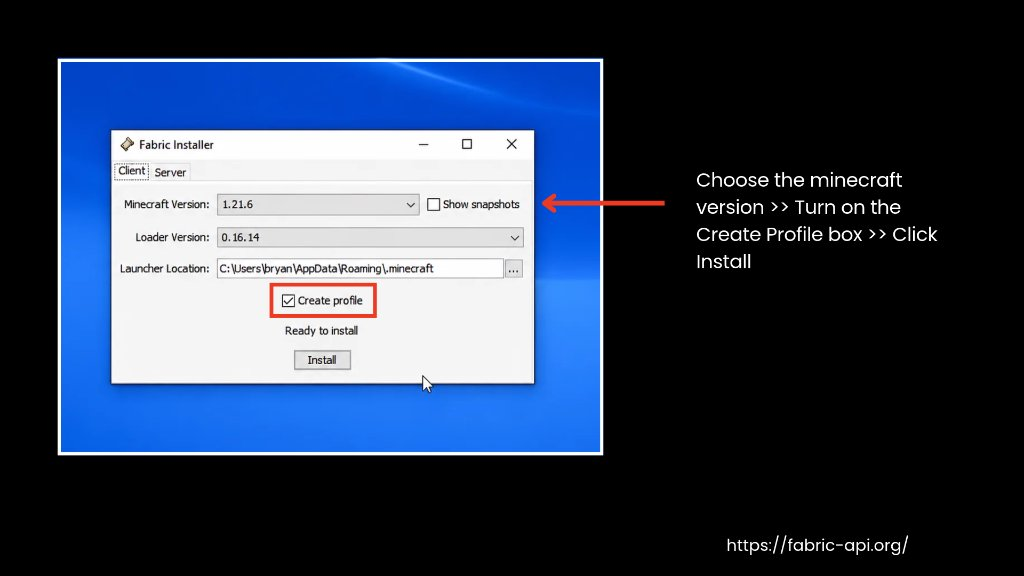
Once you choose this option, another dialog box will open. Under Minecraft Edition,
choose the version you have. Turn on the Create Profile box and click
Install. Press OK and close the window.
 Click to Zoom
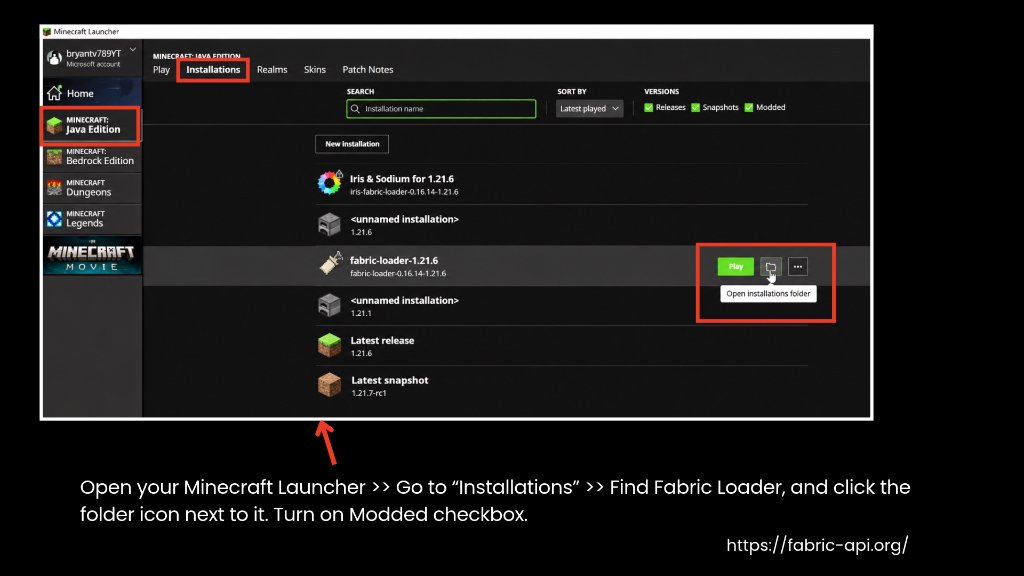
- Open your Minecraft Launcher the way you normally do. Toggle the top menu and click Installations.
-
Go to the list, find Fabric Loader, and click the folder icon next to it. Make sure the
Modded checkbox is turned on.
 Click to Zoom
-
Open the local mod folder:
%appdata%\.minecraft\modsor find the folder named mods. If you don't find it, create a new folder and name it mods.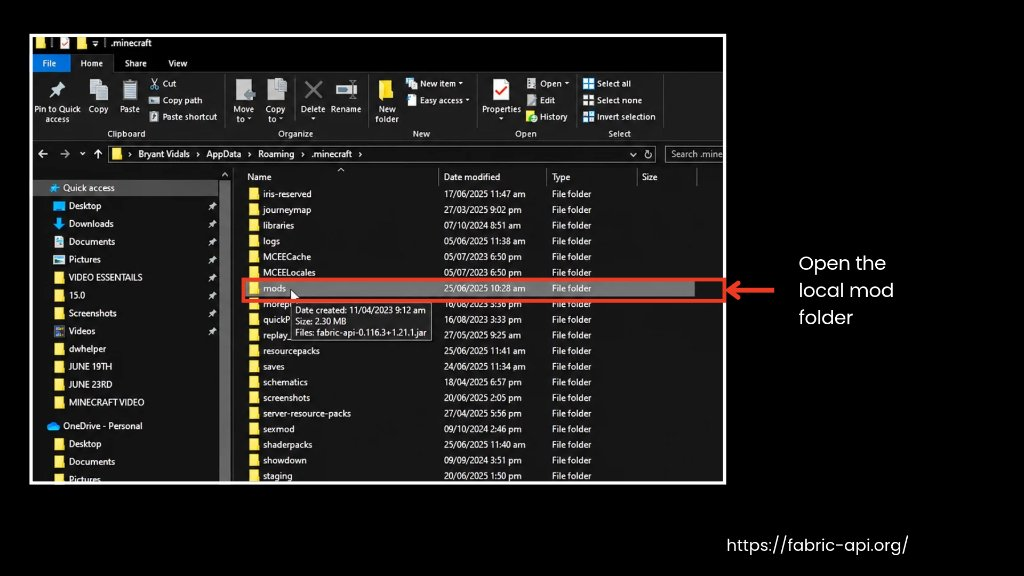 Click to Zoom
-
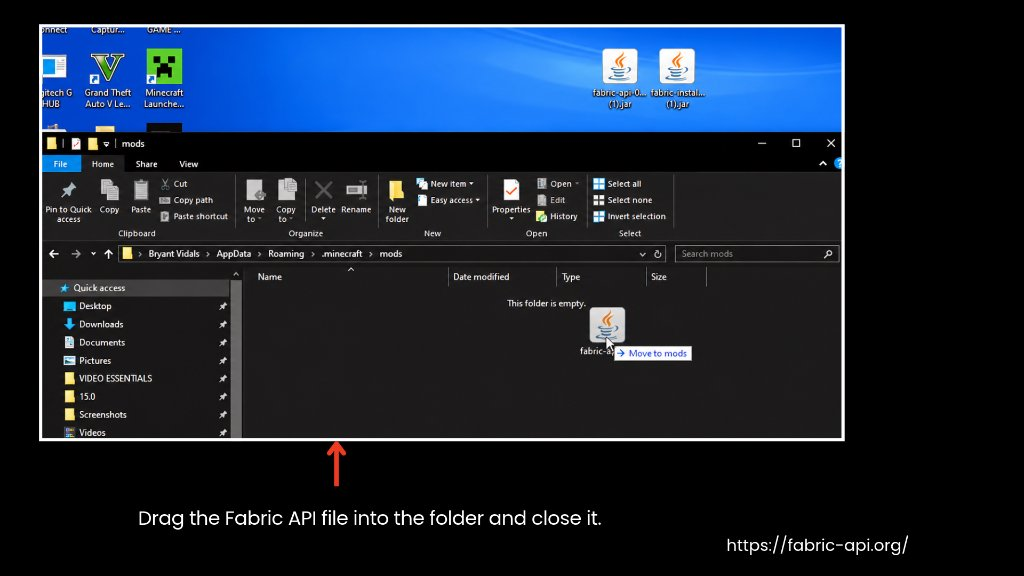
Drag the Fabric API file into the folder and close it.
 Click to Zoom
Open Minecraft Launcher:
Once you have added the Fabric API file to the “mods” folder, open the Minecraft Launcher again.
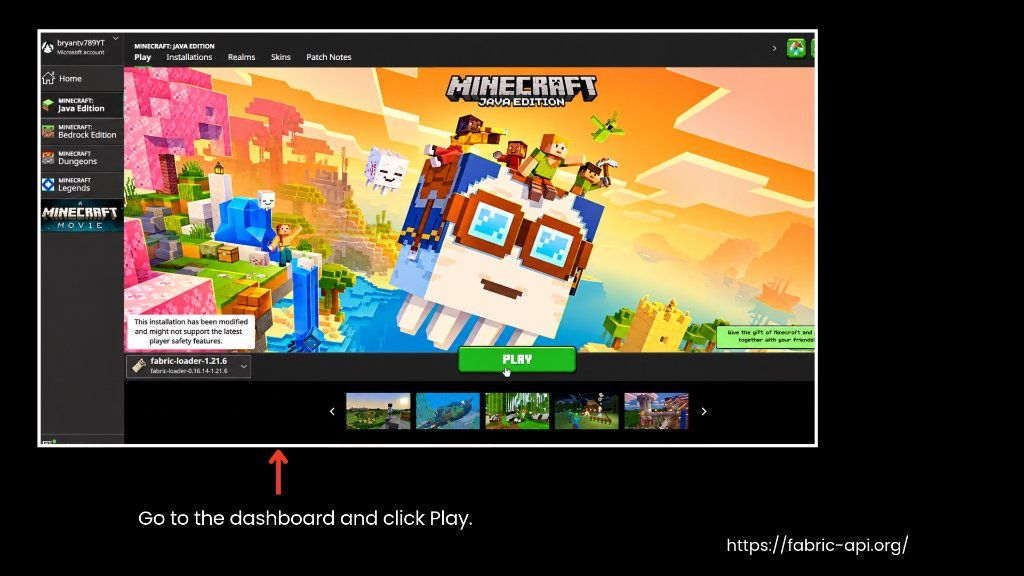
- Go to the dashboard and click Play.
 Click to Zoom
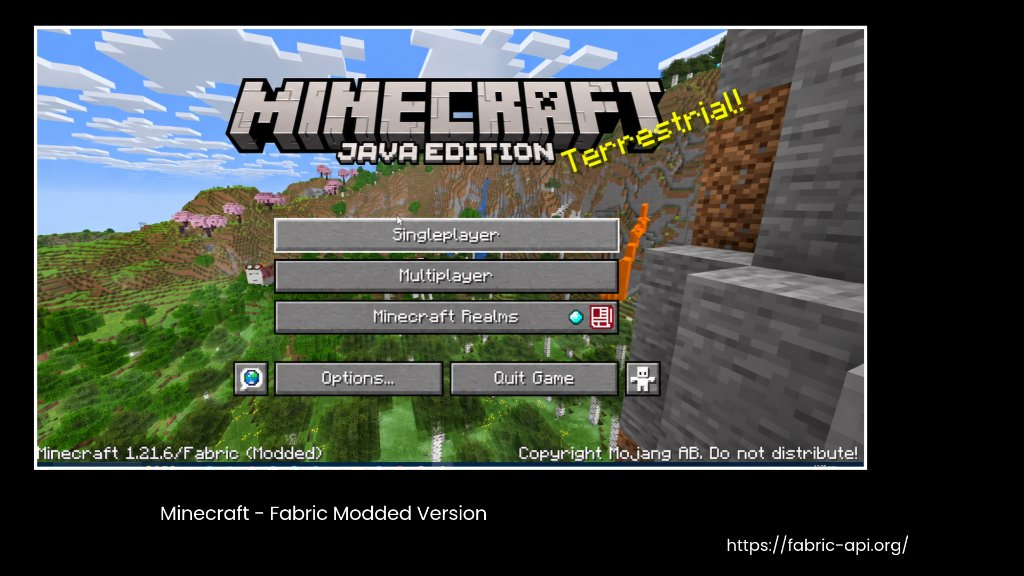
- Here at the bottom, you will see Fabric Modded added to your gameplay. Open your games and enjoy
customization.
 Click to Zoom
How Do Fabric API Work?
Fabric API is a core library of functions that gamers use in Minecraft Java Edition for modding with the help of the Fabric loader. You get different events and tools that allow the Fabric loader to start and load different mods. In simple words, Minecraft Fabric API helps users with the following roles.
01
Provides Access to New Features:
Fabric API simply provides developers with access to the extra features that many mods need to function properly. New mods use these tools to create particle effects or change existing biomes. Fabric API does not create these features itself; it helps other mods create them.
02
Supports Essential Features:
You can add different hooks, events, and APIs across multiple mods with compatibility and optimization. The event system lets mods respond to game actions, and the registry synchronization keeps the players connected to servers. Furthermore, adding crash reports is possible with Fabric API, which helps graphics overhauls with an advanced rendering API where graphics mods work together.
03
Connects a Player With mods:
Fabric API activates the mods and helps them connect with Minecraft’s own built-in features like blocks, items, and all the actions that players perform. It also exposes important functionalities, which are otherwise hidden from a new player.
04
Helps Mods Work Together:
When you install different mods, they need to work together to perform their tasks. As Fabric API is a set of shared tools, it helps make many mods compatible with each other. This allows different mods in Minecraft to work together without conflicting with one another.
You can understand all this more clearly by following this mechanism:
- Fabric Loader: Loads the mods into the game when you start Minecraft.
- Fabric API: A library mod that many mods depend on. It provides an event system that allows mods to detect different player actions.
- Mods: Run their own code to create special effects.
Features in Detail
Fabric API is a lightweight library of tools for mods. It works with the Fabric Loader, and together, they provide an alternative to Forge for Minecraft Java Edition. Developers and gamers prefer using Fabric API for the following features.
Lightweight and Easy to Use:
Fabric API’s biggest advantage is its lightweight structure. It is made up of individual modules rather than a single monolithic block. This keeps game instances leaner and faster when porting across different Minecraft versions.
Modular Architecture:
As it consists of smaller modules, handling a specific function becomes easy. Whenever a new Minecraft version is released, developers use these smaller modules to update the specific features they need. It helps them avoid changing all APIs and specifically allows them to work on the modules they need to update.
Native Mixin Support:
Developers can change or update any feature of Minecraft using Mixins within Fabric. It allows developers to modify different parts of Minecraft without changing the entire code, helping avoid conflicts between mods.
Registry and Data Synchronization:
You must have encountered the “Failed to Synchronize Registry Data from Server” error many times while playing new mods or using multiple mods. This is where Fabric API helps. Fabric API keeps all game elements, like custom items, blocks, biomes, dimensions, mobs, and other content, consistent between Minecraft servers and players so they can work properly in multiplayer.
Snapshot Readiness:
You don’t need to wait until a mod version is released. Fabric API is snapshot-ready, so you can check, test, modify, and execute the mod files you create with Fabric API. This helps developers maintain mod updates and community planning on an ongoing basis, with continuous development and improvements until the final version is released.
High Performance & Stability:
Having a light footprint, the Fabric API doesn’t face any heavy performance penalties caused by older loaders. It works great with modern optimization mods like Sodium.
Community Supported:
Other APIs like Forge can be terribly slow and less suitable for people who want modding out of the box. While Fabric supports trying out different things, you can also find many helpful discussions that solve users’ real queries. You can ask the same question a hundred times on r/fabricmc and still get answers that may not be available through Forge support.
Why Use Minecraft Fabric API?
Fabric API has become the number one choice of gamers and developers because of its registry synchronization, rendering support, modular structure, and shared event hooks. Here is how it benefits players over other API ecosystems.
01
Mod Dependency on Shared Toolchain
Fabric API is a library mod that provides common APIs for mods to use when interacting with each other. It is based on shared tools and functions needed for Minecraft mods to work. The best thing about Fabric API is that, instead of creating separate tools for every mod, developers can use the same Fabric API functions across multiple mods. This makes mod development easier and helps reduce compatibility issues. Also, many mods cannot work together without this shared toolchain system because of its fundamental hooks and interoperability features.
02
Easy & Accurate Mod Development
Though Minecraft has become flexible to changes over time, it is still not inherently made for modifications, so modding becomes quite technical. Minecraft code is modified in a non-standard way; you need to change its class files to develop new mods. Unlike other modding APIs, Fabric Loader, alongside Fabric API, doesn’t overwrite Minecraft class files; it only injects code using the Mixin library.
03
Regular and Quick Updates
Because of snapshot readiness, Fabric API updates itself quickly as soon as a new Minecraft version is released. So developers don’t have to wait long. People can try out different mod ideas, prototyping, and their execution with its toolchains.
FAQs
Is it safe to download Fabric API?
Yes, it is completely safe to download and use Fabric API if you use a trusted resource. You can download it from our website or trusted websites like CurseForge or Modrinth.
Is Fabric API free?
Yes, Fabric API is an open-source program that is free to download and use.
Should I use the Fabric API?
Yes, you should use Fabric API if you develop or play Minecraft mods in Java Edition.
Why is my Minecraft game crashing with a "Fabric API missing" error?
This happens when you have added multiple mods to your Minecraft mods folder but missed the Fabric API .jar file, or your Fabric API version does not match your Minecraft version. It may also be caused by a faulty installation or because you have not installed Fabric API at all. So, check all these things one by one.
Is Fabric API the Same as the Fabric Loader?
No, both are different. Fabric Loader starts the mods (loads them, actually), while Fabric API is a shared API library of tools and functions that different mods need to operate.
Conclusion
Fabric API is an important library for Minecraft players and developers who enjoy using and creating mods. It provides shared tools and functions that help many Fabric-based mods work properly. Fabric API makes it easier for developers to create and maintain mods, from supporting custom features to improving mod compatibility. If you plan to use Fabric mods, make sure to check whether they require Fabric API and choose a version that is compatible with your Minecraft installation.